BYROW2D and BYCOL2D
=BYROW2D(array, LAMBDA(row, expression) )
=BYCOL2D(array, LAMBDA(col, expression) )
| Argument | Description | Example |
|---|---|---|
| array | The original two-dimensional array | |
| expression | A formula that returns a single value or vector |
NOTE: The BiROW and BiCOL lambda functions used by Excel Esport players are more efficient (faster) than the BYROW2D and BYCOL2D functions on this page. BiROW and BiCOL use an efficient divide-and-conquer approach to implement a binary recursion tree for VSTACK, rather than processing rows linearly (appending one at a time to the accumulator). The slowness of BYROW2D (compared to BiROW) has to do with VSTACK needing to append rows to an increasingly large array. You start to see this with > 1000 rows.
The BiROW and BiCOL functions are variants of the BMAPλ function created by Peter Bartholomew. See these articles:
- Excel LAMBDA Spotlight: Bisected Map with BMAPλ
- Recursive LAMBDA implementation of Excel's REDUCE function.
In the template file, navigate to the General worksheet to see the BYROW2D function in action.
Description
BYROW2D and BYCOL2D are able to return two-dimensional arrays (multiple columns and rows) rather than only one-dimensional arrays (a single column or single row). The idea for these functions came from the post on answers.microsoft.com by Tobias Brandt.
The built-in BYROW and BYCOL functions in Excel are usually simpler to use than the REDUCE function when you want to perform some function on each individual row or column of an array. However, one of the main limitations of these functions is that the expression can only return a single value, resulting in the output of BYROW being a single column or the output of BYCOL being a single row.
BYROW2D and BYCOL2D are designed to use the same syntax as BYROW and BYCOL, but in the case of BYROW2D, the expression can return a row vector instead of a single value. Likewise for BYCOL2D, the expression can return a column vector instead of a single value.
The following example is similar to ROWSUM and COLSUM except that both a SUM and AVERAGE are returned.
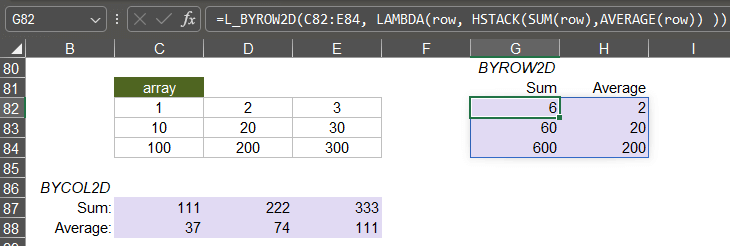
Lambda Formula
This code for using BYROW2D in Excel is provided under the License as part of the LAMBDA Library, but to use just this function, you may copy the following code directly into your spreadsheet.
Code for AFE Workbook Module (Excel Labs Add-in)
/**
* Like BYROW, but can return a multi-column array instead of just a single column
*/
BYROW2D = LAMBDA(array, function,
LET(doc,"https://www.vertex42.com/lambda/byrow2d.html",
    REDUCE("",
        SEQUENCE(ROWS(array)),
        LAMBDA(acc,i,IF(i=1,
            function(CHOOSEROWS(array,i)),
            VSTACK(acc,function(CHOOSEROWS(array,i)))
        ))
    )
));
/**
* Like BYCOL, but can return a multi-row array instead of just a single row
*/
BYCOL2D = LAMBDA(array, function,
LET(doc,"https://www.vertex42.com/lambda/byrow2d.html",
    REDUCE("",
        SEQUENCE(COLUMNS(array)),
        LAMBDA(acc,i,IF(i=1,
            function(CHOOSECOLS(array,i)),
            HSTACK(acc,function(CHOOSECOLS(array,i)))
        ))
    )
));
Here are a couple of similar functions that seem to work better when dealing with sequences and vectors that return columns or rows each time the function is run.
/**
* HSTACK the result of expression for each value in a vector
* HSTACK_ForEach(vector, LAMBDA(val, expression) ))
*/
HSTACK_ForEach = LAMBDA(vector, function,
LET(doc,"https://www.vertex42.com/lambda/byrow2d.html",
    DROP(REDUCE("", vector,
        LAMBDA(acc,val, HSTACK(acc, function(val) ) )
    ),,1)
));

/**
* VSTACK the result of expression for each value in a vector
* VSTACK_ForEach(vector, LAMBDA(val, expression) ))
*/
VSTACK_ForEach = LAMBDA(vector, function,
LET(doc,"https://www.vertex42.com/lambda/byrow2d.html",
    DROP(REDUCE("", vector,
        LAMBDA(acc,val, VSTACK(acc, function(val) ) )
    ),1)
));
Named Function for Google Sheets
Name: BYROW2D
Description: Like BYROW, but can return a row vector instead of just a single value
Arguments: array, function
Function:
[in the works]
BYROW2D Examples
HSTACK_ForEach Example
Creating fancy sequences quickly can make me really confused. The HSTACK_ForEach and VSTACK_ForEach functions are not much more concise than just using REDUCE itself, but at least for me, they are easier to wrap my head around. This example stacks {1}, {1,2}, {1,2,3}, {1,2,3,4}.
=HSTACK_ForEach(SEQUENCE(4), LAMBDA(val, SEQUENCE(1,val) ) )

Result: {1,1,2,1,2,3,1,2,3,4}.
Changing this to use VSTACK_ForEach stacks each of the sequences vertically:
=VSTACK_ForEach(SEQUENCE(4), LAMBDA(val, SEQUENCE(1,val) ) )

Result: {1, #N/A, #N/A, #N/A;
         1,    2, #N/A, #N/A;
         1,    2,    3, #N/A;
         1,    2,    3,    4}
When your function works with just specifying the first parameter, such as SEQUENCE(val), then you can use the shorter method to call it. In this case if we use SEQUENCE in place of MYFUNCTION, we get the following:
=VSTACK_ForEach(SEQUENCE(4), MYFUNCTION )

Result: {1;1;2;1;2;3;1;2;3;4}