Debt Snowball Calculator
How fast can I get out of debt? How much can I save in interest payments? Use our Debt Reduction Calculator to help answer those questions. Getting out of debt is not easy, but with a good plan and firm determination, it is entirely possible. The debt snowball calculator is a simple spreadsheet available for Excel and Google Sheets that helps you come up with a plan. It uses the debt roll-up approach, also known as the debt snowball, to create a payment schedule that shows how you can most effectively pay off your debts.
One of the most powerful things about this spreadsheet is the ability to choose or create different debt reduction strategies, including the popular debt snowball (paying the lowest balance first) or the debt avalanche (paying the highest-interest first). Choose the strategy from a dropdown box after you enter your creditor information into the worksheet. These snowball strategies could potentially save you 100s or even 1000s of dollars.
Debt Reduction Calculator Tutorial
Watch the following video to see how to use a debt snowball to pay off your debts.

Regardless of the strategy you choose, the first step in a debt snowball plan is to make a budget, then stick to it. The more you can squeeze out of your budget to increase your debt snowball, the faster you'll reach your goals. You should also consider other financial goals and risk factors besides just paying off debt as fast as possible.
After you've decided how much to pay towards debt each month, enter that amount into the calculator as your Total Monthly Debt Payment. This total remains the same each month. The thing that changes is the extra payment (the snowball) that is thrown at your current debt target. Continue reading below for more information about the various debt reduction strategies.
Debt Reduction Calculator - Free Version
for Excel and Google Sheets
Download
Over 1.4 million downloads!
⤓ Excel (.xlsx)Include up to 10 creditors. Purchase the extended or pro version to list up to 20 or 40!
Other Versions
License: Personal Use Only (not for distribution or resale, see below for a professional license)
Update Sept 2026 - Some minor updates to the free version - mostly formatting, labels, notes, etc.
Description
"Just wanted to thank you for the debt reduction calculator spreadsheet. It has helped me to get my debt under control and I will be debt free with the exception of my mortgage in a couple months. I started with about $42k of debt and will have paid it off in a little over 2 years with the help of the spreadsheet and insane budgeting."- Lisa
Use the Vertex42 debt snowball calculator to help you eliminate your credit card, auto, student loan, and other debts. Easily create a debt reduction schedule based on the popular debt snowball strategy, or experiment with your own custom strategy.
In the first worksheet, you enter your creditor information and your total monthly payment. You'll then see a summary of when each of the debts will be paid off based on the strategy you choose.

Debt Snowball Payment Schedule: The spreadsheet includes a payment schedule that lists all of the payments for each debt. You can use it to see which debt you need to apply the snowball (extra payment) to each month. This worksheet is where most of the calculations take place. The results are summarized in the main Calculator worksheet, so you don't need to edit anything in this payment schedule worksheet.
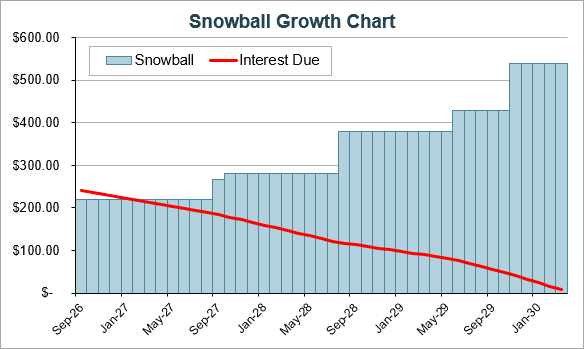
Click image to view full size
Snowball Growth Chart: Each version of the spreadsheet (including the free version) has a Snowball Growth Chart. It shows you how the snowball (your extra payment) increases over time. Each increase in the Snowball represents the point where one of the debts is paid off, with that debt's minimum payment then added into the snowball.
Debt Reduction Calculator - Extended Version
For Excel and Google Sheets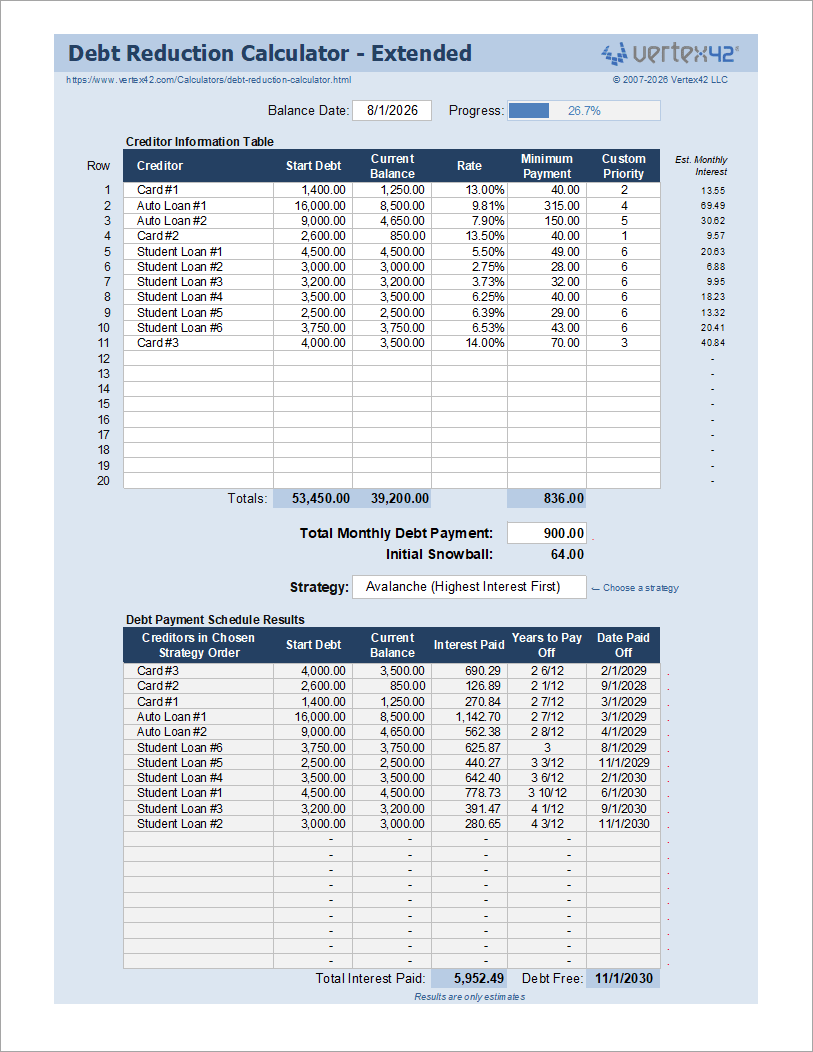
Over 18,000 Users!
Need to list more than 10 creditors? The Extended version lets you list up to 20 or even 40 creditors. For the price of a nice lunch, you can figure out how to save yourself hundreds or thousands of dollars!
License: Personal Use Only (not for distribution or resale, see below for a professional license)
Update Sept 2026 - We've made significant updates to the Extended version, including improved formatting, labels, cell comments, and Help content. New features include the Start Debt column, debt payoff progress tracking, and additional charts.
The Extended version is basically the same as the free version except for the following differences:
- More creditors: This is the main reason, of course, to get the extended version. We've made a 20-creditor version as well as a 40-creditor version, and you can download whichever one you need.
- Minor formatting differences: As you can see from the screenshot, the extended version is blue and there are a few minor layout and label changes.
- Start Debt: The extended version includes a Start Debt column for you to keep track of your original balance. It also includes a progress bar at the top comparing your Total Current Balance to your Total Start Debt.
- Updated Help Content: In the latest version, we've modified labels and cell comments and updated the help content.
- New Snowball Chart: In addition to the Snowball Growth Chart, we've added a new chart that shows the relative size of all of the payments over time.
It really boils down to this: Try the free version. If you like it and want to list more than 10 debts at a time, get the Extended version.
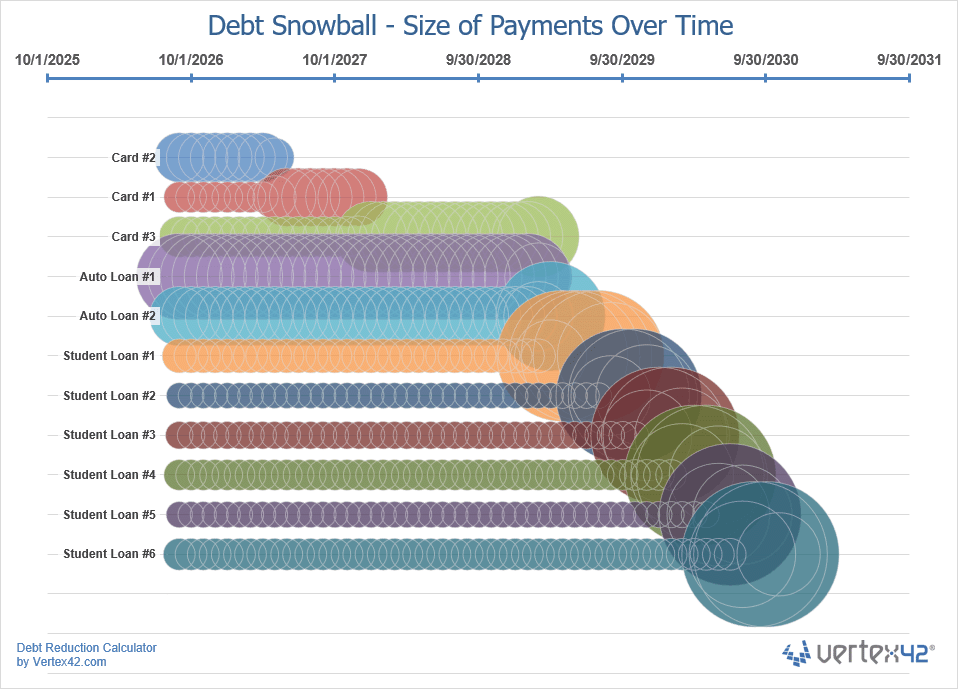
Click image to view full size
Size of Payments Over Time: The new extended (and pro) versions include a new chart that shows the relative size of the debt payments over time. The size of the bubble represents the size of the payment. The large circles that you see in the example represent the original Minimum Payment plus the applied Snowball payment.
Debt Reduction Calculator (Pro Version)
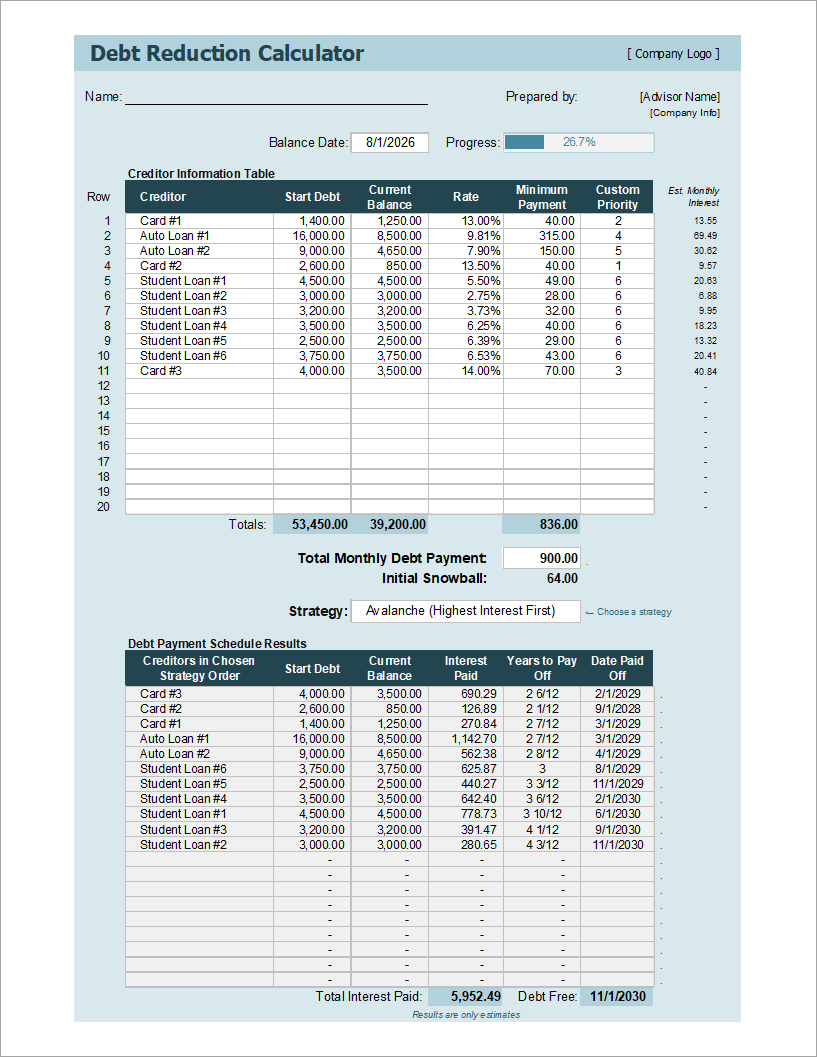
List up to 20 or even 40 creditors!
Use the calculator in your business to help advise clients!
Buy Now via ClickBank.net60-DAY MONEY-BACK Guarantee
 Try it out! If you don't think it was worth the cost, I will refund your purchase.
Template Details
Description
"We have multiple rentals, and so mortgage loans. We were paying down each loan, distributing our liquid cash among all the loans evenly. When we found the debt reduction calculator we ran multiple preprogramed scenarios, and a couple of our own and discovered the optimum method for us. The Debt Reduction Calculator saved us hours of time, a quarter of a million dollars and will result in our paying off all loans in 1/2 the time. Thanks for sharing a great way to evaluate and strategize debt reduction."- Morgen Kimbrell & David Hayhurst
The Pro version serves two main purposes:
1. You can list more than 10 creditors.
One of the spreadsheets lets you list up to 20 creditors, and if that isn't enough, there is also a version that lets you list up to 40. A pro version of the 10-creditor spreadsheet is also included.
2. The Commercial Use License allows you to use the spreadsheet in your business.
- Unlike the free or extended versions, which are only for personal use, you can use the pro version to help clients that you are advising or for your own internal business purposes.
- The template includes a section at the top to list your client's name and the preparer's name and address (see the screenshot). Other than this header change and moving Vertex42 information outside the print area, the files are basically the same as the free and extended versions.
- You can use the pro version to print reports or create PDF reports, but the commercial license doesn't permit sharing the actual spreadsheet file.
Using the Debt Snowball Calculator
Follow these simple steps to use the debt snowball worksheet:
- Enter abbreviated names for your credit card or lending institution, the current balances, and the interest rate information for all of your current debts (including home equity lines of credit or second mortgages).
- Enter the minimum payment you will make each month for each debt. You may need to verify your minimum payment with your lending institution. For some debts, like credit cards, the minimum payment may change over time. This spreadsheet assumes a fixed minimum payment for each debt, so you may want to update the calculator every few months.
- Enter the total monthly payment that you can pay each month towards your debts, based on your home budget. The difference between the total minimum payments and your total monthly payment is your initial snowball. This initial snowball, or "extra payment," is applied to one debt target at a time, depending on the order defined by your chosen strategy.
- Look at the results table to see the debts in your chosen order along with the total interest paid and the months to pay off each debt. Experiment with different payoff strategies, or use the Custom Priority column to define your own payoff order.
Important: The payment schedule is an estimated projection based on the balances, interest rates, minimum payments, and other information you enter. Follow your lender's required payment terms and update the calculator periodically with your current balances and payment information.
How Does the Snowball Effect Work?
The snowball effect is the idea that a snowball grows as it rolls down a hill. When applied to debt reduction, the snowball effect refers to how your extra payment grows as you pay off each debt.
As defined above, the snowball is the difference between your total minimum payments and your total monthly debt payment. In the calculator, the total monthly debt payment remains the same from month to month. The snowball is the extra payment that you will make on your current debt target.
After you pay off your first debt, you no longer need to make the minimum payment on that debt. So, that payment amount gets rolled into your snowball. Your new larger snowball becomes the extra payment that you apply to the next debt in the sequence.
There are times when your snowball is larger than the remaining balance on your current debt target. In that case, the spreadsheet automatically divides your snowball between the current and next target.
Debt Reduction Strategies
This section describes the different strategies that you can choose within the debt snowball spreadsheet. Each of these strategies has to do with the order that you target your debts with your snowball.
Unless you choose the "No Snowball" option, ALL of these strategies make use of the snowball effect described above. For more information, see Dave Ramsey's article on the debt snowball effect, or read his book, "The Total Money Makeover".
- Debt Snowball (Lowest Balance First): This popular strategy prioritizes the debt with the lowest initial balance. Paying off small debts sooner can provide motivation to continue with your plan - it's nice to have early wins. This strategy may result in paying more interest in the end than the Highest Interest First method.
- Debt Avalanche (Highest Interest First): This strategy prioritizes the debt with the highest interest rate. This strategy generally results in the lowest total interest, although it may take you longer to see your first loan completely paid off. If the difference in the total interest is not significant, you may prefer the motivational benefit of the Lowest Balance First method. Or, you can use the Custom Priority option to fully customize the payoff order.
- Order Entered in the Table: This strategy prioritizes debts in the exact order they appear in the table (from top to bottom). You can rearrange the debts in the table to change your payoff order, or use Custom Priority to define your own order.
- No Snowball: This option uses only the Minimum Payments entered in the Creditor Information Table. This does not use the Total Monthly Debt Payment amount. Select this option to see how long it will take to pay off the debts without maintaining a constant monthly payment (no snowball / no extra payment).
- Custom Priority (Lowest First / Highest First): This strategy uses the values in the Custom Priority column to determine the payoff order. This lets you define your own custom order if none of the other built-in methods do exactly what you want. Select "Custom - Lowest First" or "Custom - Highest First" to specify how the values are prioritized.
- Debt Snowflaking: This is a term for making extra debt payments above the normal monthly payment (above and beyond the normal snowball). You can add "snowflakes" for any given month, using the "Additional" column in the PaymentSchedule worksheet. See the article What is a Debt Snowflake? to see how to add snowflakes to the debt snowball calculator.
Important Assumptions and Limitations
The results and Payment Schedule are estimates based on the information you enter and the following assumptions. See the cell notes in the spreadsheet for more explanations.
Fixed Interest Rates: Interest rates are assumed to remain constant throughout the payoff period. If your rates change, update the calculator with the current rates.
Fixed Minimum Payments: The Minimum Payments you enter are assumed to remain constant until each debt is paid off. Actual credit-card minimum payments may change as balances change.
Interest Calculation: Interest is estimated monthly as Balance × Annual Interest Rate ÷ 12. Your lender may calculate interest differently, such as accruing interest daily.
No Additional Charges or Fees: The calculations assume no new purchases, additional borrowing, late fees, annual fees, or other charges are added to the debts.
Monthly Payment Timing: The Payment Schedule assumes payments are made once per month and that all debts use the same payment date. Actual payment dates may vary by creditor.
Verify Your Actual Payments: The Payment Schedule is an estimate based on the information and assumptions used by this calculator. Always verify your required payments, balances, interest charges, and payoff amounts with your lenders.
Cash Flow and Liquidity Considerations
Important: Interest rate and balance aren't the only factors you may want to consider when choosing a payoff order. Paying off a debt may improve your monthly cash flow by eliminating its required payment, but using available cash to pay down debt can also reduce your liquidity. Consider maintaining an appropriate emergency fund and balancing debt reduction with your other financial goals.
For more about liquidity risk and debt payoff, see my article "Is Debt Payoff a Good Investment?"
Debt Reduction Resources
- How to Get Out of Debt with the Debt Snowball Plan at daveramsey.com
- Online Debt Reduction Calculator at extension.usu.edu (used to be www.PowerPay.org) - I used this to compare with the spreadsheet. It allows a few more options for minimum payments.
- Sample Letter to Student Loan Servicer - at consumerfinance.gov, Oct 16, 2013 - This article includes a sample letter for explaining to your loan servicer how you want your extra payments to be applied.
 Make a Budget
Follow Us On ...