Purchase Order Template
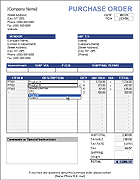
This purchase order (PO) template for Excel is a simple and budget-friendly solution for your business. If you need to create purchase orders, you may not need special software. If you already use Excel or Google Sheets, just download our Purchase Order Template and customize it to create an order form with your contact and shipping information.
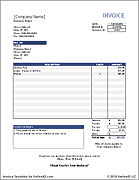
This PO template was created based on our original sales invoice template, so buyers and sellers can benefit from using similar tools. If you are a vendor and need a purchase order form template for your customers to use, you can simply point them to this page.
Purchase Order Template
for Excel, OpenOffice, and Google Sheets
Download
⤓ Excel (.xlsx)Other Versions
License: Private Use (not for distribution or resale)
Author: Jon Wittwer
To create a purchase order, follow these steps:
- Customize the purchase order spreadsheet by adding your company's name, contact, and shipping information.
- Add the seller's contact information in the Vendor section.
- Save a backup copy of your file (perhaps a separate copy for each major vendor).
- After you complete the order form, save a copy for archival purposes.
- Save the PO as a PDF file and email it to your supplier.
You can use the Purchase Order Tracker spreadsheet to keep track of the POs that you create. Doing this will also help you know what PO# to assign to the next order.
Purchase Order with Vendor List

Download
⤓ Excel (.xlsx)License: Private Use
(not for distribution or resale)
Description
This version of the purchase order template includes drop-down lists for selecting the Vendor and the Ship To location, using the technique described on the Customer List page.
What is the difference between an invoice and a purchase order?
A Purchase Order (PO) is an official order form completed by the buyer to communicate the specific services and products the buyer agrees to purchase from the seller, including descriptions, quantities and prices. An invoice is created by a seller to bill a client for products and services. A purchase order is not a bill.
When the seller accepts the purchase order, it becomes a legally binding agreement between the seller and buyer. The seller will then prepare an invoice as either a receipt for payment already recieved, or to request payment. When a PO is used, the invoice should include the PO Number as a reference. When products are shipped, the seller includes a packing slip in the package which should reference the PO Number and/or Invoice Number.
The purpose of a purchase order is to communicate exactly what you want to buy from the seller, how you want the order and shipment handled, and to provide an official record (i.e. contract) that can help protect both the buyer and seller if there are problems with the the payment or delivery. A purchase order system is especially important in a business when multiple people are handling purchases, inventory, and accounting.
Related Order and Invoice Templates


How to Use and Fill Out the Purchase Order Template
Values within [brackets] are meant to be replaced with your company (the buyer) or vendor (the seller) information. Below are descriptions of fields used in the worksheet:
- [Company Name]: The main title and address listed at the top of the order form is for the buyer - the company requesting the order.
- P.O.#: The Purchase Order number is used by the buyer to track their POs.
- Vendor: The name and address of the vendor (the seller).
- Ship To: Your company's name and address - where you want the products to be shipped to.
- Requisitioner: The name of the person ordering the products (the buyer). This person is usually the contact listed at the bottom of the order form.
- Ship Via: The method of shipment such as "UPS Ground", "Federal Express", that the buyer is requesting.
- F.O.B.: This stands for "Free On Board" which is usually "Destination" or "Shipping Point". For more information, see F.O.B. at wikipedia.com
- Shipping Terms: This field is usually used for payment terms such as the method of payment or when the payment is due (usually set by the vendor or seller). Details that don't fit within the Terms field can be described in more detail in the Special Instructions block.
For general information about purchase orders, see Wikipedia.com.
How to Send a Purchase Order to a Supplier
The recommended way to send the completed PO to a vendor is to email a PDF version of the document. Excel allows you to easily convert your worksheet to a PDF by using Save As and selecting PDF from the type list. If using Google Sheets, go to File > Download As > PDF Document (.pdf). You can also print out the PO and mail it to the supplier if emailing isn't an option.
If you are a Vendor or Supplier and want to send a pre-completed purchase order template to a specific client (containing your address info for example), you may do so provided that the TermsOfUse and/or © worksheet is not hidden, removed, or modified, and as long as you don't put the spreadsheet on the internet. You are welcome to create a printable PO as a PDF file and put that on your website for your clients to use, but we'd prefer that you simply refer them to this page to download their own spreadsheet.